

Download this example
Download this example as a Jupyter Notebook or as a Python script.
Q3D Dynamic link to Twin Builder for the DC-Link bus bars of a drive inverter#
The example based in the DC-Link bus bars of a three-phase inverter covers the electro-thermal workflow with the Harmonic loss calculation in Q3D Extractor and temperature and thermal anlaysis in Icepak.
Why power-loss estimation is challenging?#
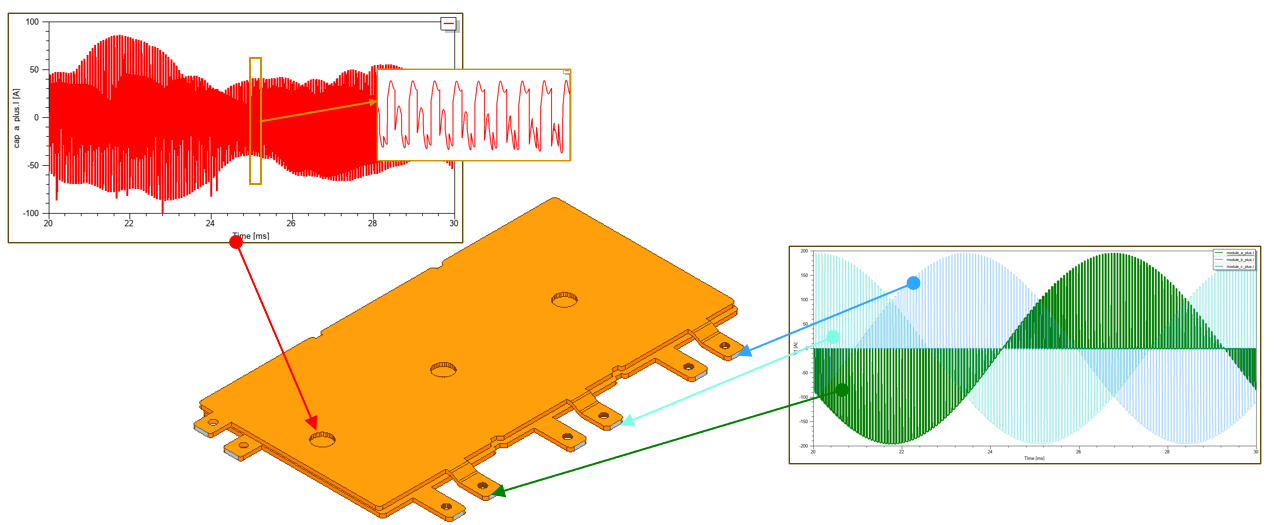
Accurate estimation of power-loss density in passive interconnects such as DC-link bus bars is challenging because multiple terminals can share the same conduction path, PWM currents introduce rich harmonic content, and terminal currents can be phase-shifted.
Under these conditions, it is difficult to define equivalent DC currents that both reproduce the actual losses and satisfy current balance according to Kirchhoff’s current law.
Two common solutions are:
Time-domain workflow using the Maxwell A-Phi solver.
Frequency-domain workflow using Q3D Extractor (or SIwave for PCBs) for harmonic-loss calculation.
This example follows the frequency-domain approach and demonstrates how to use Q3D Extractor to compute harmonic losses in the DC-link bus bars of a three-phase inverter. It covers the electro-thermal workflow with the Harmonic loss calculation in Q3D Extractor and temperature and thermal anlaysis in Icepak.
Harmonic loss calculation workflow#
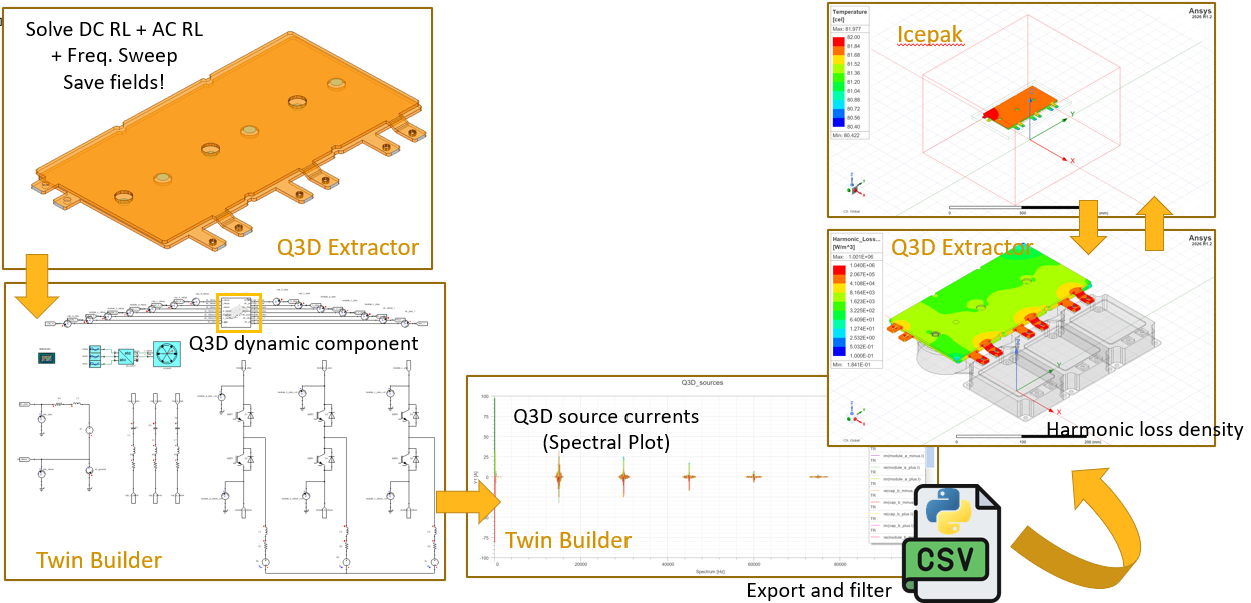
Keywords: Twinbuilder, Q3D, Icepak, Electrothermal.
Perform imports and define constants#
Perform required imports.
[1]:
import tempfile
import time
from pathlib import Path
[2]:
import ansys.aedt.core
import pandas as pd
from ansys.aedt.core import get_pyaedt_app
from ansys.aedt.core.examples.downloads import download_file
Define constants#
Constants help ensure consistency and avoid repetition throughout the example.
[3]:
AEDT_VERSION = "2026.1"
NUM_CORES = 4
NG_MODE = False  # Open AEDT UI when it is launched.
TB_DESIGN_NAME = "3ph_circuit"
Q3D_DESIGN_NAME = "q3d_3ph"
ICEPAK_DESIGN_NAME = "Icepak_1"
# Set to True to run Icepak solve and post-processing.
# If left as False, analyze_setup() and post-processing calls are skipped.
SOLVE_ICEPAK = False
Create temporary directory#
Create a temporary working directory. The name of the working folder is stored in temp_folder.name.
Note: The final cell in the notebook cleans up the temporary folder. If you want to retrieve the AEDT project and data, do so before executing the final cell in the notebook.
[4]:
temp_folder = tempfile.TemporaryDirectory(suffix=".ansys")
Download AEDT file#
Set the local temporary folder to export the AEDT file to.
[5]:
project_path = download_file(
    source="q3d_dynamic_link",
    name="busbar_q3d_tb.aedt",
    local_path=temp_folder.name,
)
Launch Twinbuilder AEDT#
Create an instance of the Twinbuilder class. The Ansys Electronics Desktop will be launched with the active Twinbuilder design. The tb object is subsequently used to create and simulate the model.
[6]:
tb = ansys.aedt.core.TwinBuilder(
    project=project_path,
    design=TB_DESIGN_NAME,
    version=AEDT_VERSION,
    non_graphical=NG_MODE,
    new_desktop=True,
)
PyAEDT INFO: Parsing C:\Users\ansys\AppData\Local\Temp\tmp8sx_hd6s.ansys\pyaedt\q3d_dynamic_link\busbar_q3d_tb.aedt.
PyAEDT INFO: Python version 3.10.11 (tags/v3.10.11:7d4cc5a, Apr  5 2023, 00:38:17) [MSC v.1929 64 bit (AMD64)].
PyAEDT INFO: PyAEDT version 1.8.dev0.
PyAEDT INFO: Initializing new Desktop session.
PyAEDT INFO: AEDT version 2026.1.
PyAEDT INFO: File C:\Users\ansys\AppData\Local\Temp\tmp8sx_hd6s.ansys\pyaedt\q3d_dynamic_link\busbar_q3d_tb.aedt correctly loaded. Elapsed time: 0m 0sec
PyAEDT INFO: New AEDT session is starting on gRPC port 49494.
PyAEDT INFO: Starting new AEDT gRPC session on port 49494.
PyAEDT INFO: Launching AEDT server with gRPC transport mode: wnua
PyAEDT INFO: Electronics Desktop started on gRPC port 49494 after 11.7 seconds.
PyAEDT INFO: AEDT installation Path C:\Program Files\ANSYS Inc\v261\AnsysEM
PyAEDT INFO: 2026.1 version started with process ID 5292.
PyAEDT INFO: Non-graphical mode detected. Disabling Desktop logs.
PyAEDT INFO: Project busbar_q3d_tb has been opened.
PyAEDT INFO: Active Design set to 25650;3ph_circuit
PyAEDT INFO: AEDT objects correctly read
Model representation#
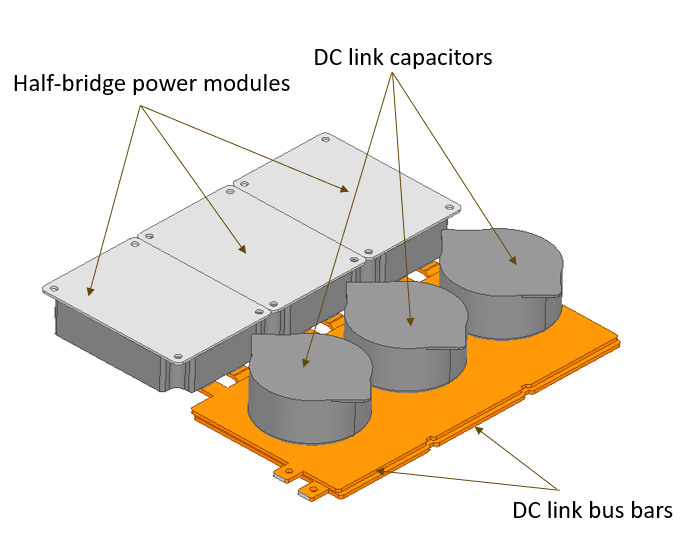
DC Link Busbars of a Three-phase PWM Inverter#
Two busbars for DC link: DC plus and DC minus
7 terminals per busbar: DC input, 3 terminals for capacitor banks, 3 terminals for the connection to 3 half-bridge power modules
PWM currents with rich harmonic content:#
Add Q3D component to Twinbuilder schematic#
Add a Q3D dynamic link to the Twinbuilder schematic. The Q3D State Space component creates a state-space model that is valid over a range of frequencies. The component uses RLGC model extracted from the Q3D design to create a frequency sweep.
[7]:
comp = tb.add_q3d_dynamic_component(
    source_project=tb.project_name,
    source_design_name=Q3D_DESIGN_NAME,
    setup="Setup1",
    sweep="Sweep1",
    coupling_matrix_name="Original",
    state_space_dynamic_link_type="RLGC"
)
tb.set_active_design(TB_DESIGN_NAME)
PyAEDT INFO: Python version 3.10.11 (tags/v3.10.11:7d4cc5a, Apr  5 2023, 00:38:17) [MSC v.1929 64 bit (AMD64)].
PyAEDT INFO: PyAEDT version 1.8.dev0.
PyAEDT INFO: Returning found Desktop session with PID 5292!
PyAEDT INFO: Project busbar_q3d_tb set to active.
PyAEDT INFO: Active Design set to q3d_3ph
PyAEDT INFO: AEDT objects correctly read
PyAEDT INFO: ModelerCircuit class has been initialized! Elapsed time: 0m 0sec
PyAEDT INFO: ModelerTwinBuilder class has been initialized!
PyAEDT INFO: Python version 3.10.11 (tags/v3.10.11:7d4cc5a, Apr  5 2023, 00:38:17) [MSC v.1929 64 bit (AMD64)].
PyAEDT INFO: PyAEDT version 1.8.dev0.
PyAEDT INFO: Returning found Desktop session with PID 5292!
PyAEDT INFO: Project busbar_q3d_tb set to active.
PyAEDT INFO: Active Design set to 25650;3ph_circuit
PyAEDT INFO: AEDT objects correctly read
[7]:
True
Place component on schematic#
Place the dynamic component on the schematic at the desired location (expressed in mm). Add page ports and ammeters to each terminal of the component.
[8]:
x_position = 0.05
y_position = 0.05
comp.location = [x_position, y_position]
ammeter_x_factor = 0
previous_value = 0
reset = False
for pin in comp.pins:
    current_value = pin.angle
    if current_value != previous_value:
        if not reset:
            ammeter_x_factor = 0
            reset = True
        angle_page_port = 180
        angle_ammeter = 270
        ammeter_x_factor += 0.015
        label_position = "Right"
        ammeter_y_factor = -0.002
    else:
        angle_page_port = 0
        angle_ammeter = 90
        ammeter_x_factor -= 0.015
        label_position = "Left"
        ammeter_y_factor = 0.002

    prefix_1 = "dc_plus"
    prefix_2 = "dc_minus"
    prefix = prefix_1 if pin.name.startswith(prefix_1) else prefix_2
    terminal = pin.name.split(prefix, 1)[1].lstrip("_")
    ammeter = tb.modeler.schematic.create_component(
        name=terminal,
        component_library="Basic Elements\\Measurement\\Electrical",
        component_name="AM",
        location=[pin.location[0] + ammeter_x_factor, pin.location[1] - ammeter_y_factor],
        angle=angle_ammeter,
    )
    comp_page_port = tb.modeler.schematic.create_page_port(name=terminal,
                                                           location=ammeter.pins[0].location,
                                                           label_position=label_position,
                                                           angle=angle_page_port)
    tb.modeler.schematic.create_wire([ammeter.pins[1].location, pin.location])
PyAEDT INFO: ModelerCircuit class has been initialized! Elapsed time: 0m 0sec
PyAEDT INFO: ModelerTwinBuilder class has been initialized!
Solve transient setup#
Solve the transient setup.
[9]:
tb.analyze_setup("TR")
PyAEDT INFO: Solving design setup TR
PyAEDT INFO: Design setup TR solved correctly in 0.0h 10.0m 30.0s
[9]:
True
Twinbuilder Post-processing : Time domain#
Create reports for capacitor currents, load currents, DC current and voltage.
[10]:
cap_currents = tb.post.create_report(
    expressions=["Ca.I", "Cb.I", "Cc.I"],
    primary_sweep_variable="Time",
    plot_name="Capacitor Currents",
)
PyAEDT INFO: Post class has been initialized! Elapsed time: 0m 0sec
PyAEDT WARNING: No report category provided. Automatically identified Standard
add markers at 10ms and 20ms
[11]:
cap_currents.add_cartesian_x_marker("10ms")
cap_currents.add_cartesian_x_marker("20ms")
[11]:
'MX_BH44LT'
Plot only between 10ms and 20ms
[12]:
cap_currents_range = tb.post.create_report(
    expressions=["Ca.I", "Cb.I", "Cc.I"],
    primary_sweep_variable="Time",
    plot_name="Capacitor Currents - [10ms-20ms]",
)
cap_currents_range.edit_x_axis_scaling(min_scale="10ms", max_scale="20ms")
PyAEDT WARNING: No report category provided. Automatically identified Standard
[12]:
True
[13]:
i_load = tb.post.create_report(
    expressions=["L4.I", "L5.I", "L6.I"],
    primary_sweep_variable="Time",
    plot_name="Load Currents",
)
i_dc = tb.post.create_report(
    expressions=["dc_ground.I"],
    primary_sweep_variable="Time",
    plot_name="Idc",
)
v_dc = tb.post.create_report(
    expressions=["Vdc_minus.V", "Vdc_plus.V"],
    primary_sweep_variable="Time",
    plot_name="Vdc",
)
PyAEDT WARNING: No report category provided. Automatically identified Standard
PyAEDT WARNING: No report category provided. Automatically identified Standard
PyAEDT WARNING: No report category provided. Automatically identified Standard
Twinbuilder Post-processing : Frequency domain#
Create spectral reports for all sources in the whole spectral domain. Get the list of sources from the Q3D design. Then, create a spectral report in Twinbuilder for the real and imaginary parts of the source currents.
[14]:
q3d = get_pyaedt_app(tb.project_name, Q3D_DESIGN_NAME)
sources = [source.name for source in q3d.boundaries_by_type["Source"]]
tb = get_pyaedt_app(tb.project_name, TB_DESIGN_NAME)
PyAEDT INFO: Python version 3.10.11 (tags/v3.10.11:7d4cc5a, Apr  5 2023, 00:38:17) [MSC v.1929 64 bit (AMD64)].
PyAEDT INFO: PyAEDT version 1.8.dev0.
PyAEDT INFO: Returning found Desktop session with PID 5292!
PyAEDT INFO: Project busbar_q3d_tb set to active.
PyAEDT INFO: Active Design set to q3d_3ph
PyAEDT INFO: AEDT objects correctly read
PyAEDT INFO: Python version 3.10.11 (tags/v3.10.11:7d4cc5a, Apr  5 2023, 00:38:17) [MSC v.1929 64 bit (AMD64)].
PyAEDT INFO: PyAEDT version 1.8.dev0.
PyAEDT INFO: Returning found Desktop session with PID 5292!
PyAEDT INFO: Project busbar_q3d_tb set to active.
PyAEDT INFO: Active Design set to 25650;3ph_circuit
PyAEDT INFO: AEDT objects correctly read
[15]:
expressions = []
for source in sources:
    expressions.append(f"re({source}.I)")
    expressions.append(f"im({source}.I)")
Create the spectral report for real and imaginary parts of source currents
[16]:
new_report = tb.post.reports_by_category.spectral(expressions, "TR")
new_report.algorithm = "FFT"
new_report.window = "Rectangular"
new_report.max_frequency = "100kHz"
new_report.time_start = "20ms"
new_report.time_stop = "30ms"
new_report.variations = {"Spectrum": "All"}
new_report.create("Q3D_sources")
new_report.edit_x_axis_scaling(units="Hz")
PyAEDT INFO: Post class has been initialized! Elapsed time: 0m 2sec
PyAEDT WARNING: No report category provided. Automatically identified Standard
[16]:
True
Export report in a CSV file
[17]:
report_path = tb.post.export_report_to_csv(temp_folder.name, "Q3D_sources")
Filter data#
Filter out rows where at least one between real and imaginary part of any source current is below a defined threshold.
[18]:
q3d_sources_unfiltered = pd.read_csv(report_path, sep=",")
threshold = 0.01
Delete a row if and only if both re and im are below the threshold value for all sources at that frequency. Build per-source masks where True indicates that both parts of the source are below the threshold for that row.
[19]:
df = q3d_sources_unfiltered.copy()
src_masks = []
for source in sources:
    col_re = f"re({source}.I) [A]"
    col_im = f"im({source}.I) [A]"
    re_vals = pd.to_numeric(df[col_re], errors="coerce").abs()
    im_vals = pd.to_numeric(df[col_im], errors="coerce").abs()
    src_masks.append((re_vals < threshold) & (im_vals < threshold))
[20]:
# A row is removed only if every source mask is True for that row
rows_all_small = pd.concat(src_masks, axis=1).all(axis=1) if src_masks else pd.Series(False, index=df.index)
q3d_sources_filtered = df[~rows_all_small]
Save filtered data back to a new CSV file
[21]:
q3d_sources_filtered_path = Path(tb.working_directory) / "Q3D_sources_filtered.csv"
q3d_sources_filtered.to_csv(q3d_sources_filtered_path, sep=",", index=False)
Save real and imaginary part in separate tab-separated files Each .tab file will contain two columns: frequency and the corresponding part (real or imaginary) After exporting, import each .tab file as a dataset 1D in Q3D
[22]:
freq_column = q3d_sources_filtered.columns[0]
[23]:
for col in q3d_sources_filtered.columns[1:]:
    # Save the DataFrame as a tab-separated file
    new_file_name = Path(tb.working_directory) / f"{col}.tab"
    q3d_sources_filtered[[freq_column, col]].to_csv(new_file_name, sep="\t", index=False)

    # Determine dataset name and import it
    if col.split("(")[0] == "re":
        dataset_name = f"re_{col.split('(')[1].split('.')[0]}"
    elif col.split("(")[0] == "im":
        dataset_name = f"im_{col.split('(')[1].split('.')[0]}"
    q3d.import_dataset1d(str(new_file_name), name=dataset_name, is_project_dataset=False)
PyAEDT INFO: Parsing C:\Users\ansys\AppData\Local\Temp\tmp8sx_hd6s.ansys\pyaedt\q3d_dynamic_link\busbar_q3d_tb.aedt.
PyAEDT INFO: File C:\Users\ansys\AppData\Local\Temp\tmp8sx_hd6s.ansys\pyaedt\q3d_dynamic_link\busbar_q3d_tb.aedt correctly loaded. Elapsed time: 0m 1sec
PyAEDT INFO: aedt file load time 0.5558218955993652
PyAEDT INFO: Dataset re_cap_a_minus doesn't exist.
PyAEDT INFO: Dataset re_cap_a_minus created successfully.
PyAEDT INFO: Dataset im_cap_a_minus doesn't exist.
PyAEDT INFO: Dataset im_cap_a_minus created successfully.
PyAEDT INFO: Dataset re_cap_a_plus doesn't exist.
PyAEDT INFO: Dataset re_cap_a_plus created successfully.
PyAEDT INFO: Dataset im_cap_a_plus doesn't exist.
PyAEDT INFO: Dataset im_cap_a_plus created successfully.
PyAEDT INFO: Dataset re_module_a_minus doesn't exist.
PyAEDT INFO: Dataset re_module_a_minus created successfully.
PyAEDT INFO: Dataset im_module_a_minus doesn't exist.
PyAEDT INFO: Dataset im_module_a_minus created successfully.
PyAEDT INFO: Dataset re_module_a_plus doesn't exist.
PyAEDT INFO: Dataset re_module_a_plus created successfully.
PyAEDT INFO: Dataset im_module_a_plus doesn't exist.
PyAEDT INFO: Dataset im_module_a_plus created successfully.
PyAEDT INFO: Dataset re_cap_b_minus doesn't exist.
PyAEDT INFO: Dataset re_cap_b_minus created successfully.
PyAEDT INFO: Dataset im_cap_b_minus doesn't exist.
PyAEDT INFO: Dataset im_cap_b_minus created successfully.
PyAEDT INFO: Dataset re_cap_b_plus doesn't exist.
PyAEDT INFO: Dataset re_cap_b_plus created successfully.
PyAEDT INFO: Dataset im_cap_b_plus doesn't exist.
PyAEDT INFO: Dataset im_cap_b_plus created successfully.
PyAEDT INFO: Dataset re_module_b_minus doesn't exist.
PyAEDT INFO: Dataset re_module_b_minus created successfully.
PyAEDT INFO: Dataset im_module_b_minus doesn't exist.
PyAEDT INFO: Dataset im_module_b_minus created successfully.
PyAEDT INFO: Dataset re_module_b_plus doesn't exist.
PyAEDT INFO: Dataset re_module_b_plus created successfully.
PyAEDT INFO: Dataset im_module_b_plus doesn't exist.
PyAEDT INFO: Dataset im_module_b_plus created successfully.
PyAEDT INFO: Dataset re_cap_c_minus doesn't exist.
PyAEDT INFO: Dataset re_cap_c_minus created successfully.
PyAEDT INFO: Dataset im_cap_c_minus doesn't exist.
PyAEDT INFO: Dataset im_cap_c_minus created successfully.
PyAEDT INFO: Dataset re_cap_c_plus doesn't exist.
PyAEDT INFO: Dataset re_cap_c_plus created successfully.
PyAEDT INFO: Dataset im_cap_c_plus doesn't exist.
PyAEDT INFO: Dataset im_cap_c_plus created successfully.
PyAEDT INFO: Dataset re_module_c_minus doesn't exist.
PyAEDT INFO: Dataset re_module_c_minus created successfully.
PyAEDT INFO: Dataset im_module_c_minus doesn't exist.
PyAEDT INFO: Dataset im_module_c_minus created successfully.
PyAEDT INFO: Dataset re_module_c_plus doesn't exist.
PyAEDT INFO: Dataset re_module_c_plus created successfully.
PyAEDT INFO: Dataset im_module_c_plus doesn't exist.
PyAEDT INFO: Dataset im_module_c_plus created successfully.
Q3D: Harmonic loss setup#
Specify real and imaginary currents for each source to compute harmonic loss.
[24]:
harmonic_loss = {}
for source in sources:
    re_dataset_name = next(d for d in list(q3d.design_datasets.keys()) if source in d and "re" in d.lower())
    im_dataset_name = next(d for d in list(q3d.design_datasets.keys()) if source in d and "im" in d.lower())
    harmonic_loss[source] = (re_dataset_name, im_dataset_name)
q3d.edit_sources(harmonic_loss=harmonic_loss)
[24]:
True
Q3D Post-processing#
Plot the harmonic loss density on the surface of the objects
[25]:
plot = q3d.post.create_fieldplot_surface(["dc_terminal", "dc_terminal_1_2"],
                                         "Harmonic_Loss_Density",
                                         intrinsics={"Freq": "0.5GHz", "Phase": "0deg"})
q3d.save_project()
PyAEDT INFO: PostProcessor class has been initialized! Elapsed time: 0m 4sec
PyAEDT INFO: Post class has been initialized! Elapsed time: 0m 4sec
PyAEDT INFO: Modeler class has been initialized! Elapsed time: 0m 0sec
PyAEDT INFO: Active Design set to q3d_3ph
PyAEDT INFO: Parsing design objects. This operation can take time
PyAEDT INFO: Refreshing bodies from Object Info
PyAEDT INFO: Bodies Info Refreshed Elapsed time: 0m 0sec
PyAEDT INFO: 3D Modeler objects parsed. Elapsed time: 0m 0sec
PyAEDT INFO: Project busbar_q3d_tb Saved correctly
[25]:
True
[26]:
fs = plot.folder_settings
fs.scale_settings.scale_type = "MinMax"
fs.update()
fs.scale_settings.scale_settings.max_value = 1040000
fs.scale_settings.scale_settings.min_value = 0.1
fs.scale_settings.log = True
fs.update()
Create Icepak Design#
Create an Icepak to run a thermal simulation
[27]:
ipk = ansys.aedt.core.Icepak(version=AEDT_VERSION, design=ICEPAK_DESIGN_NAME)
PyAEDT INFO: Python version 3.10.11 (tags/v3.10.11:7d4cc5a, Apr  5 2023, 00:38:17) [MSC v.1929 64 bit (AMD64)].
PyAEDT INFO: PyAEDT version 1.8.dev0.
PyAEDT INFO: Returning found Desktop session with PID 5292!
PyAEDT INFO: No project is defined. Project busbar_q3d_tb exists and has been read.
PyAEDT INFO: Added design 'Icepak_1' of type Icepak.
PyAEDT INFO: AEDT objects correctly read
Busbar model in Icepak#
In the thermal simulation, the busbars are usually integrated in a larger CAD assembly
In this example, the focus is on the electrothermal workflow, and a simplified thermal model is used
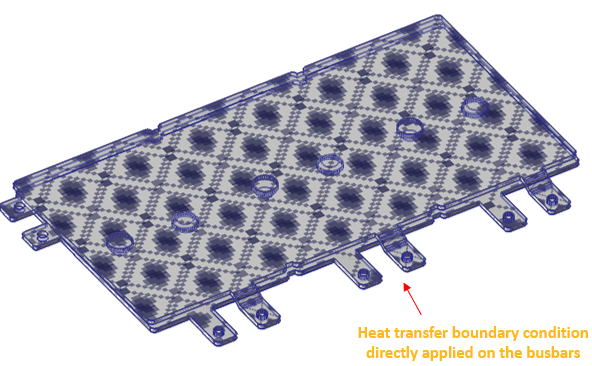
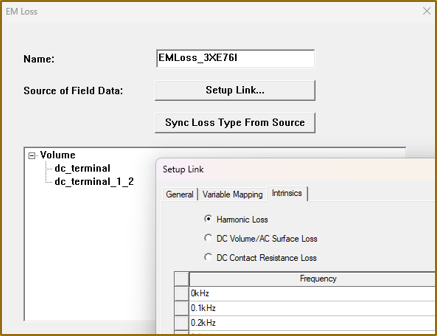
EM loss setup with Harmonic Loss option enabled:
Copy bodies from Q3D to Icepak#
Copy solid bodies from Q3D design to Icepak design
[28]:
copy_bodies_from_q3d = q3d.modeler.get_objects_by_material("copper") + q3d.modeler.sheet_objects
ipk.copy_solid_bodies_from(q3d, assignment=copy_bodies_from_q3d, include_sheets=True)
PyAEDT INFO: Modeler class has been initialized! Elapsed time: 0m 0sec
[28]:
True
Change region padding and create subregion#
Change region padding and create subregion to enclose the objects imported from Q3D
[29]:
padding = ["Percentage Offset", "Percentage Offset", "Percentage Offset", "Percentage Offset",
           "Absolute Offset", "Absolute Offset"]
ipk.modeler.change_region_padding(
    padding_data=[100, 100, 50, 50, "200mm", "200mm"],
    padding_type=padding
)
ipk.modeler.get_objects_by_material("air")[0].is_model = False
subregion = ipk.modeler.create_subregion(padding_values=[10, 10, 10, 10, 50, 50],
                                         padding_types="Percentage Offset",
                                         assignment=["dc_terminal", "dc_terminal_1_2"],
                                         name="Subregion")
Assign EM losses#
Assign EM losses from Q3D to the objects imported in Icepak. Set the harmonic loss values computed in Q3D as intrinsic values for the EM loss boundary condition.
[30]:
variables_mapping = {}
for key, value in q3d.variable_manager.design_variables.items():
    variables_mapping[key] = value.expression
[31]:
ipk.assign_em_losses(
    design=Q3D_DESIGN_NAME,
    setup="Setup1",
    sweep="LastAdaptive",
    parameters=variables_mapping,
    assignment=["dc_terminal", "dc_terminal_1_2"],
)
PyAEDT INFO: Boundary EMLoss EMLoss_QB91RP has been created.
[31]:
EMLoss_QB91RP
[32]:
k = list(q3d.design_datasets.keys())[0]
result = [f"{v / 1000}{q3d.design_datasets[k].xunit}" for v in q3d.design_datasets[k].x]
[33]:
EM_loss = ipk.boundaries_by_type["EMLoss"][0]
EM_loss.auto_update = False
EM_loss.props["ForceSourceToSolve"] = False
EM_loss.props["PreservePartnerSoln"] = False
EM_loss.props["Intrinsics"] = ["500MHz"]
EM_loss.props["Q3DEMLossType"] = "HarmonicLoss"
EM_loss.props["IntrinsicsHarmonicLoss"] = result
EM_loss.props["HarmonicLossSweepCoupling"] = False
EM_loss.update()
[33]:
True
Assign stationary wall boundary condition#
Assign stationary wall boundary condition with temperature to the sources
[34]:
ipk.assign_stationary_wall_with_temperature(
    geometry=["module_a_minus", "module_a_plus", "module_b_minus", "module_b_plus", "module_c_minus", "module_c_plus"],
    name="stationary_wall",
    temperature=80,
    thickness="10mm",
    material="Al-Extruded",
    radiate=False,
    radiate_surf_mat="Steel-oxidised-surface",
    shell_conduction=True,
)
PyAEDT INFO: Boundary Stationary Wall stationary_wall has been created.
[34]:
stationary_wall
Icepak setup#
Set “Temperature” as the only problem type in the Icepak setup
[35]:
setup = ipk.create_setup()
setup.props["Include Flow"] = False
Analysis#
Analyze the Icepak design
[36]:
if SOLVE_ICEPAK:
    ipk.analyze_setup(ipk.setups[0].name, cores=None)
Icepak Post-processing#
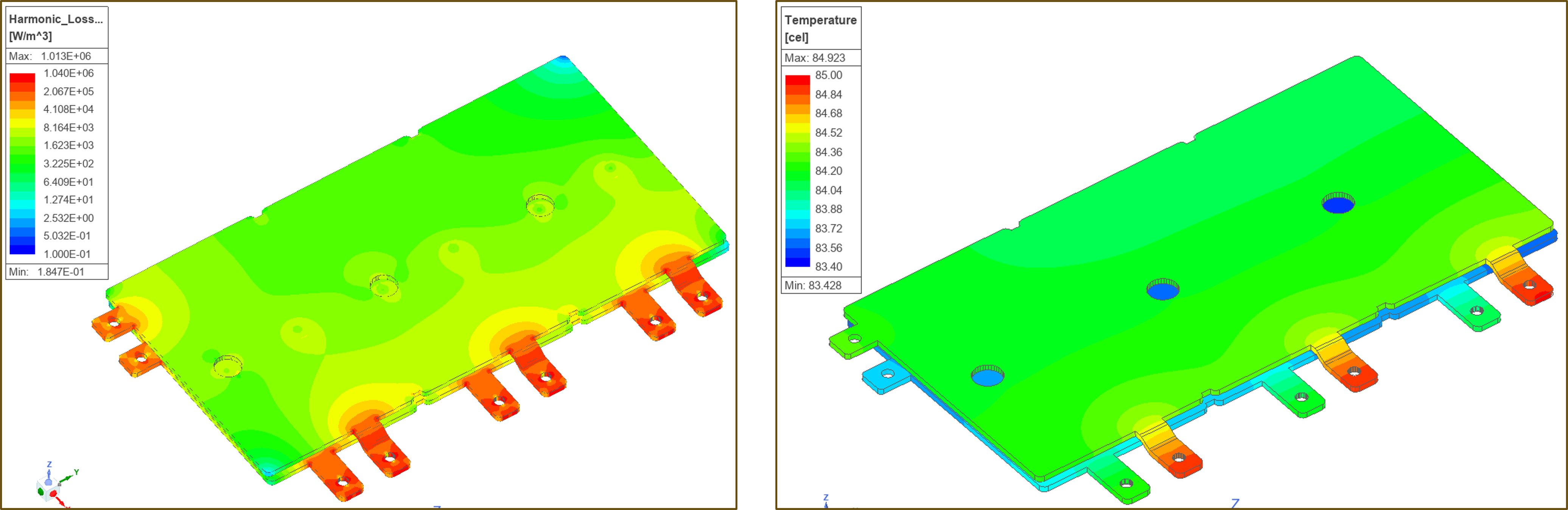
Post-processing: plot temperature distribution and volumetric heat loss on the surface of the objects
[37]:
if SOLVE_ICEPAK:
    temp = ipk.post.create_fieldplot_surface(assignment=["dc_terminal", "dc_terminal_1_2"], quantity="Temperature", plot_name="Temperature")
    vol_heat_loss = ipk.post.create_fieldplot_volume(assignment=["dc_terminal", "dc_terminal_1_2"], quantity="VolumeHeatLoss", plot_name="VolumeHeatLoss")
Loss and temperature maps#
Release AEDT#
[38]:
ipk.save_project()
ipk.release_desktop()
PyAEDT INFO: Project busbar_q3d_tb Saved correctly
PyAEDT INFO: Desktop has been released and closed.
[38]:
True
[39]:
# Wait 3 seconds to allow AEDT to shut down before cleaning the temporary directory.
time.sleep(3)
Clean up#
All project files are saved in the folder temp_folder.name. If you’ve run this example as a Jupyter notebook, you can retrieve those project files. The following cell removes all temporary files, including the project folder.
[40]:
temp_folder.cleanup()
Download this example
Download this example as a Jupyter Notebook or as a Python script.